Printers & Products
Software
Services
Solutions
Partners
Support
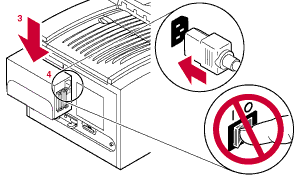
Caution: To avoid damaging components, turn off the printer, any external disks or other devices, before you connect or disconnect a SCSI cable. Turn on the disk, and other devices, before you turn on the printer. See Important guidelines before continuing.
Caution: To avoid damaging components, turn off the printer, any external disks or other devices, before you connect or disconnect a SCSI cable. Turn on the disk, and other devices, before you turn on the printer.
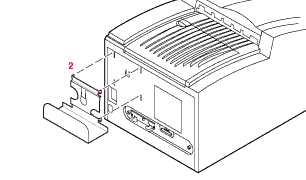
Insert the four hooks on the corners of the bracket into the four slots in the printer's rear panel. Slide the bracket down into place.
Place the disk into the bracket with the four rubber feet facing toward the printer, and the connectors on the disk's rear panel facing the printer's connectors. The cut-out shapes on the bracket should line up with the air vent on the disk.
Connect the power cord to the disk then into a grounded wall outlet. Do not turn the disk on yet.
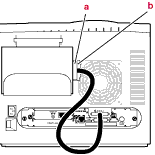
There are two SCSI connectors on the disk's rear panel.
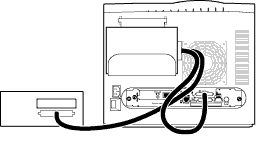
The other connector is for the terminator if this disk is at the end of the SCSI chain.
If you have another disk connected to this disk, do not attach a terminator to the ZDISK disk. Do make sure the last device on the SCSI chain is terminated.